Within the Company Settings section, you will find the ‘Message Security' tab. Here you can configure the methods available to secure messages sent by users in your company.
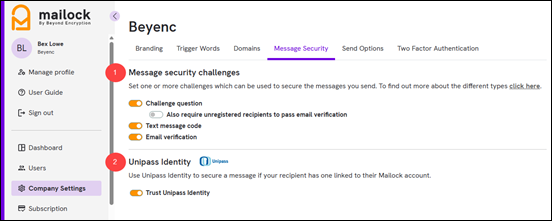
1. Message security challenges
You can enable one or more authentication methods for securing messages. Three authentication methods are available; 'Challenge question', 'Text message code' (SMS) and 'Email verification'.
By default, both 'Challenge question' and 'Text message code' are enabled.
If 'Challenge question' is enabled, you can also choose whether unregistered recipients must verify their ownership of their email address before answering the challenge question.
- Enabled - Recipients must enter a verification code sent to their email address and answer a challenge question before they can access the message.
- Disabled - Recipients only need to answer the challenge question to access the message.
This setting only applies to unregistered recipients. Recipients with a Mailock account will continue to sign in as normal.
The authentication methods and challenge question settings that you enable here determine which options are available to users within your company when sending secure messages.
Changing these settings only affects messages sent after the change is made. Messages that have already been sent are not affected.
2. Unipass Identity
Mailock integrates with Unipass Identity, a service provided by Origo, which sets standards for eCommerce in the UK financial services sector. Enabling this option adds an extra way to secure your messages using Unipass Identity. If a recipient has a Mailock account with a linked Unipass Identity, it will automatically be used as the security method for that recipient. For further info about Unipass Identity click here