
The results message gives you a quick summary:
- The overall result
- The check type and your reference
- When the check was requested and completed
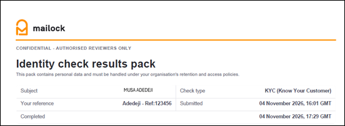
The results pack has the full details. At the top, you'll see who was checked, the check type, your reference, and when the check was submitted and completed. This lets you file the pack against the right case.
Check types
What's in your results pack depends on the check you ran. Each check includes everything in the one above it.
|
Type |
What it covers |
|
ID (Identity Document) |
The identity document, a face match against the document photo, and a liveness check |
|
KYC (Know Your Customer) |
Everything in ID, plus address verification, date of birth verification, credit activity and mortality screening |
|
AML (Anti-Money Laundering) |
Everything in KYC, plus politically exposed person (PEP) and sanctions screening |
The overall result
'Result overview' gives one of two overall results:
- 'Completed - no checks flagged': the check finished and nothing needs a closer look
- 'Completed - checks flagged for review': the check finished, but at least one result needs your attention
If checks are flagged, the pack always shows why, usually beside the result it relates to. Anything that doesn't fit elsewhere is listed under 'Also requiring review'. Review the full pack carefully before relying on the result.
A clear result is not a guarantee of identity or that there is no risk. Your organisation is responsible for its own decision, and for recording it.
The component overview
Below the overall result, 'Component overview' lists each part of the check with its own result. Depending on your check type, you'll see:
- Identity document verification
- Supplied data matches the document
- Face match
- Liveness check
- Address verification (KYC and AML)
- Date of birth verification (KYC and AML)
- Credit activity (KYC and AML)
- Mortality screening (KYC and AML)
- PEP screening and sanctions screening (AML only)
What each section of the results pack shows
Identity document verification
'Identity values compared' shows your client's name, date of birth and address in three columns:
- 'Supplied': the details you gave when you requested the check
- 'Document read': the details read from their identity document
- 'Confirmed by the subject': the details your client confirmed at the end of the check
- Details read from the document that differ from what your client confirmed
- Details your client changed by hand after they were read automatically
'Supplied data matches the document' shows whether your details match the document. If they don't, the pack tells you which fields differ, for example 'full name (middle name)' or 'address'.
The pack also flags for review:
- details read from the document that differ from what the person confirmed
- details the person changed by hand after they were read and matched automatically
Names are shown exactly as returned, so a name read from a document often appears in capitals.
A passport doesn't show an address. On a passport check, the 'Document read' column has no address, and 'Confirmed by the subject' shows the address your client typed in during the check.
'Document evidence' shows the document type, country of issue, document number, place of birth, issue and expiry dates, and whether it had expired. An expired document is flagged for review.
Fraud assessment
This shows whether the document itself appears genuine. You'll see an overall assessment of 'Low risk', 'Medium risk' or 'High risk' and, where available, the individual checks behind it, such as the photo check, detail check and document integrity.
'Fields edited after auto-read' shows how many details your client changed by hand before confirming them.
Capture Context
This shows how the check was taken: the device, operating system and browser, the IP address and approximate location, and whether a VPN was detected. Use it to judge whether the check was taken where and how you'd expect.
Reuse and velocity checks
Where available, this shows whether the same face or identity has appeared on other recent checks. It's a signal about the pattern of use, not a finding about your client.
Biometric verification
This shows two results:
- 'Face match' compares your client's face with the photo on their identity document, and shows how many facial regions matched
- 'Liveness' confirms a real person was present during the check, and shows whether they completed the requested movements
Address verification (KYC and AML)
This shows whether records place your client at the address you supplied, when they were first and last seen there, and whether any source reports they've moved. The result is one of:
- 'Verified': records confirm your client at the address
- 'Not verified': the address was found, but records didn't confirm your client at it
- 'Not found': the address wasn't found
You'll also see the types of record checked, such as current and previous electoral registers, and when each dataset was last updated. Where available, 'Address insights' lists other addresses linked to your client.
Date of birth verification (KYC and AML)
This shows whether records confirm the date of birth ('Verified' or 'Not matched'), how many matching records were found, and which parts of the date (day, month, year) each source matched.
Screening results
Screening searches public records and watchlists for names that match your client. Each screening has its own result:
|
Screening |
Check type |
Clear result |
Needs review |
|
Mortality |
KYC and AML |
'No match' |
'Match returned' |
|
PEP |
AML |
'No potential match' |
'Potential match returned' |
|
Sanctions |
AML |
'No potential match' |
'Potential match returned' |
Where a match is returned, the pack shows the matched record: name and any aliases, date of birth, categories, countries, and when it was listed and updated.
A potential match doesn't confirm the record is about your client. Compare the record with what you know about them, and follow your organisation's own procedures before reaching a view.
If your organisation's checks include them, you may also see county court judgment (CCJ), insolvency and company officer screening here. CCJ data must not be used for credit risk decisions.
Additional checks
'Credit activity' (KYC and AML) shows whether your client has an active credit history: how many accounts, across how many lenders, and when they were last updated.
If your organisation runs extra checks, such as bank account validation, phone number checks or email risk, their results appear here too.
Audit record
The audit record supports your own records. It shows:
- The provider's transaction ID and record ID
- The status the provider reported, for example 'COMPLETE'
- When your client gave consent, both to run the document check and to check their details against third-party data sources
- When the provider's record was created, and when the pack was generated
Making your decision
Your results pack reports what the Identity check returned on the completion date shown. It doesn't make a decision for you. Use it alongside your organisation's own risk assessment, and record your decision in line with your own procedures.
Your results pack contains personal data. Store and share it in line with your organisation's retention and access policies.