.png?)
Microsoft 365 Secure Email vs Mailock: A Practical Comparison
 Sabrina McClune


Microsoft 365 already provides capable email encryption, rights management and policy controls. Mailock works alongside that estate when an organisation needs a dedicated workflow for sensitive communications sent to external customers, whatever email provider those clients or customers use.
The right fit depends on the recipient journey, the assurance you need before access, the visibility senders need after sending and whether communications are sent individually or through automated processes.
The short answer
Microsoft 365 protects the wider email estate. Mailock adds controls designed for sensitive external customer communications. Many organisations keep Microsoft 365 as their core platform and add Mailock for the customer-facing workflows that need a controlled recipient journey, such as regulated communications in financial services, insurance, pensions, healthcare and legal.
Last reviewed: July 2026. Microsoft features vary by subscription, tenant configuration, Outlook client and recipient experience. Mailock features vary by plan and deployment. Confirm current requirements before implementation.
Microsoft 365 Secure Email vs Mailock at a Glance
Both platforms can protect email. Microsoft starts with the wider email and information-protection estate, while Mailock starts with the sensitive external customer workflow.
| Decision area | Microsoft 365 | What Mailock adds for external customers |
|---|---|---|
| Core role | Mailbox, identity, transport, information protection and policy estate | A specialist protected workflow for sensitive external customer email |
| Recipient access | Supported Outlook experiences or an encrypted-message portal using an eligible account or one-time passcode | A sender-chosen recipient-authentication check that works for customers on any email provider |
| Replies | Protected replies are available in eligible Microsoft experiences | Recipients reply inside the protected Mailock journey, so the exchange stays contained |
| Visibility and control | Message trace, audit, receipts and encrypted-portal activity are available in different configurations | Message Tracker shows the sender when protected content has been accessed, and Message Revoke closes future access |
| Delivery model | User sending, mail-flow rules and the wider Microsoft messaging architecture | Individual and automated protected delivery for high-volume customer communications |
The distinction becomes clearest when the two platforms are treated as complementary layers, rather than interchangeable tools.
How Mailock Fits into a Microsoft 365 Estate
Mailock sits alongside Microsoft 365 as a focused customer-communication layer, while Microsoft continues to run the organisation's mailbox, identity, transport and broader compliance controls.
"Microsoft 365 can remain at the centre of the email estate. Mailock gives firms a dedicated way to protect the sensitive customer communications that need a more controlled recipient journey."
Paul Holland, Founder and CEO, Beyond Encryption (Mailock)
For a sender, the Mailock workflow connects five practical jobs:
- Protect the message and attachments using AES-256 encryption.
- Choose a recipient-authentication check appropriate to the communication and customer context.
- Give the recipient a clear route to read and reply within the protected Mailock journey.
- See when the secure message has been accessed through Message Tracker.
- Close future access when circumstances change using Message Revoke.
Mailock supports more than one delivery route. Teams can use it on the web or through the add-in for supported classic Outlook for Windows environments. Enterprise and automated-delivery options are available for organisations that need policy-led or system-generated customer communications.
Explore how Mailock works with Microsoft 365 across individual and automated workflows.
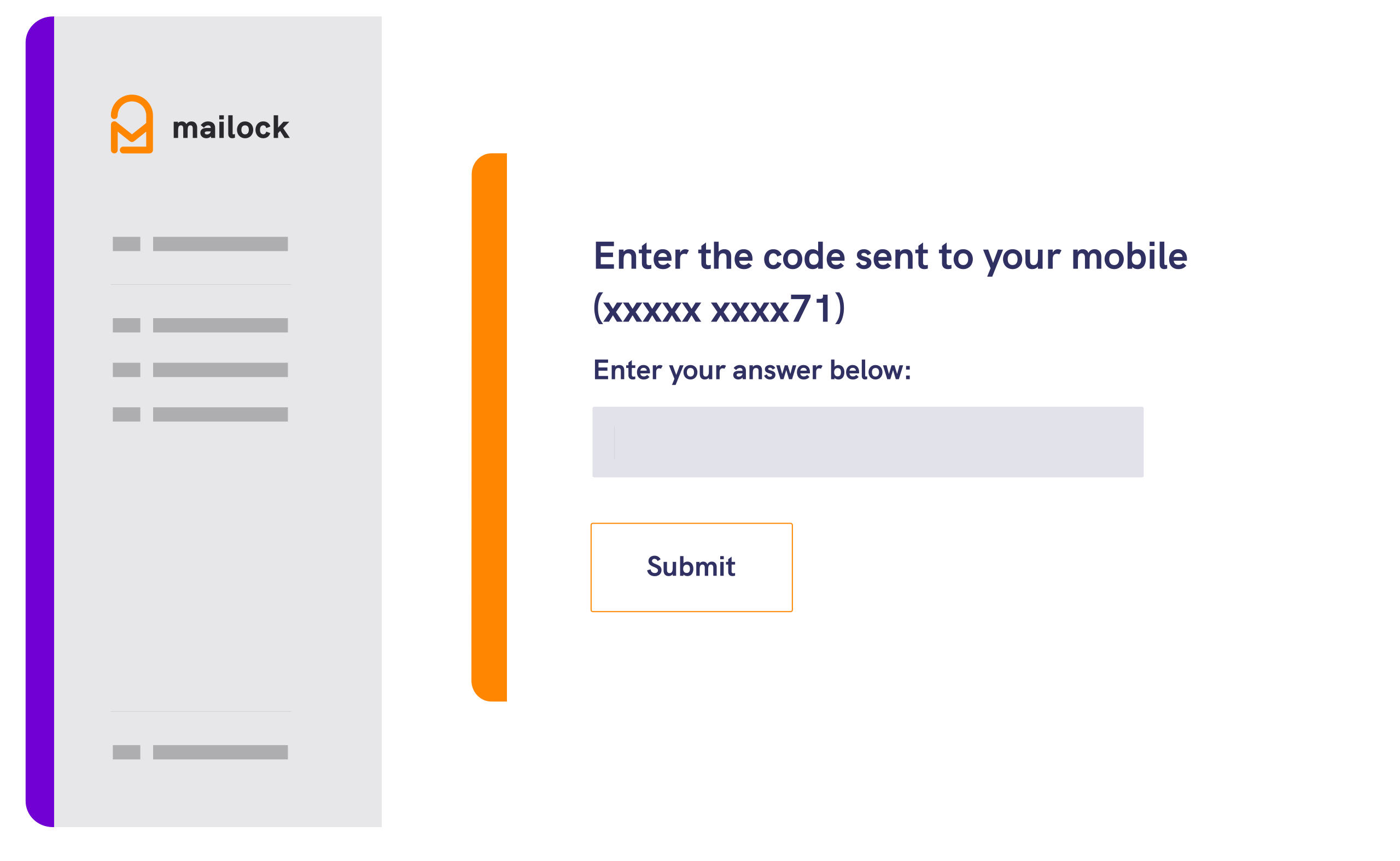
Mailock lets the sender apply a configured recipient-authentication check to the protected message. Available options depend on plan and deployment.
Why This Workflow Matters
Encryption protects content. The wider customer journey determines who can gain access, how easily they can respond, what the sender can see and what can be done if the communication changes after sending.
Recipient authentication, secure replies, Message Tracker and Message Revoke form one sender and recipient journey built around sensitive external communication, so a customer on any email provider follows the same controlled route.
What Microsoft 365 Already Covers, and Where the External-Customer Gap Appears
Microsoft 365 is a layered platform, so a fair comparison separates those layers rather than treating every Microsoft control as one encryption product. The controls below are real Microsoft capabilities, and they stay in place when Mailock is added.
- Transport and domain protection. Exchange Online uses transport controls such as TLS to protect email in transit, and SPF, DKIM and DMARC help receiving systems check that a message genuinely comes from an authorised domain. These protect the connection and the domain rather than a specific recipient's access to a protected message.
- Purview Message Encryption. Microsoft Purview Message Encryption combines email encryption with rights management. A protected message can open in eligible Outlook experiences or through Microsoft's encrypted-message portal, where external recipients sign in with an eligible Microsoft, Google or Yahoo account or an administrator-enabled one-time passcode. Microsoft does provide some recipient access controls, so the question is whether that access route suits your customers.
- Advanced Message Encryption. Advanced Message Encryption adds branding templates, expiry and administrative revocation for eligible external portal messages, and the same portal can record access activity such as sign-in method, reads, downloads, replies and forwards. These controls depend on the relevant licence and on the recipient using the portal.
- DLP, sensitivity labels and S/MIME. Microsoft Purview Data Loss Prevention can identify sensitive information and show policy tips as a user writes, sensitivity labels and mail-flow rules can apply encryption automatically, and S/MIME supports certificate-based encryption and digital signatures where certificates are managed.
- Trace, audit and recall. Message trace, Purview audit and encrypted-portal logs give evidence for different roles, and cloud-based Message Recall can remove eligible messages from mailboxes inside the same Microsoft 365 organisation.
These controls are strongest when recipients are inside your Microsoft organisation, or are themselves Microsoft, Google or Yahoo account holders. The external-customer gap appears with the recipient who uses any email provider, may not want to sign in to a portal, and still needs sensitive documents delivered through a consistent, controlled journey.
That is the job Mailock is built for, and it is why the two work well together.
Microsoft 365 and Mailock Compared by Scenario
The practical difference depends on the communication being protected. These common scenarios show where Microsoft may already meet the requirement and where Mailock adds a more focused customer workflow.
| Scenario | Microsoft 365 position | What Mailock adds |
|---|---|---|
| Protected email between users in the same Microsoft environment | Native identity, encryption, rights and policy controls may cover the requirement well. | A consistent customer-facing journey if the organisation wants the same experience across internal and external use cases. |
| External recipient with an eligible Microsoft experience | The recipient may be able to read and reply directly in Outlook with little extra friction. | A consistent protected journey and a sender-chosen recipient-authentication check, whatever the recipient's provider. |
| External customer without a native inline experience | Microsoft supports portal access using eligible account sign-in or a one-time passcode. | A dedicated customer journey with a check the sender selects for the context, and no dependency on a Microsoft account. |
| Sensitive email sent to the wrong external address | Cloud recall does not work across organisations. Advanced portal revocation may apply to eligible protected messages. | A configured recipient check adds a barrier before access, and Message Revoke closes future access to the protected message. |
| Sender needs direct visibility after sending | Microsoft offers trace, audit, receipts and portal logs for different roles and recipient routes. | Message Tracker shows the sender directly when their secure message has been accessed. |
| System-generated sensitive customer documents | The design must account for Exchange Online mailbox and tenant limits. Microsoft's High Volume Email service is for internal recipients. | Automated protected delivery built for sending sensitive documents to external customers at volume. |
The strongest option is the one that fits the recipient, the assurance required and the action the sender may need to take after sending.
When Mailock Adds Value Alongside Microsoft 365
Mailock earns its place when sensitive customer email needs a deliberate sender and recipient journey. It is most useful for regulated organisations that send statements, valuations, claims, health or account information to customers who use a mix of email providers.
"The practical value for senders is being able to choose how a customer authenticates, keep the reply protected and retain direct control over the secure message after it leaves the outbox."
Adam Byford, COO, Beyond Encryption (Mailock)
In practice, Mailock makes the secure customer journey easier to control from send to access and reply:
- You choose the recipient check for the context. The organisation aligns the authentication route with the sensitivity of the communication and what it already knows about the customer, without relying on the customer holding a particular account.
- Customers follow one clear protected journey. Senders use a consistent Mailock experience across external recipient domains, so the experience does not change from one customer's provider to the next.
- You get sender-facing visibility and post-send control. Message Tracker shows when protected content has been accessed, and Message Revoke closes future access if circumstances change.
- Secure replies stay in the protected exchange. Recipients respond within the Mailock journey rather than dropping back to ordinary email.
- You have more than one delivery route. Individual sending and automated protected delivery support different customer-communication workflows.
For a regulated sender, that means a customer on a personal Gmail or Outlook.com address receives a sensitive document through the same controlled, authenticated route as any other customer, and the sending team can see when it was accessed and step in if it was misdirected.
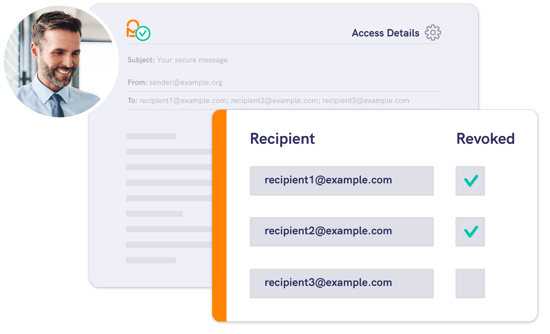
The screenshot shows Mailock's sender visibility and access controls in classic Outlook for Windows.
Before choosing a route, test it against the communications your teams send and the customers who need to receive them.
When Microsoft 365 Alone May Be the Right Fit
A configured Microsoft service may meet the requirement without another secure-email workflow when:
- most protected communication stays inside the Microsoft organisation;
- recipients already use eligible Microsoft experiences;
- the organisation's chosen account or one-time-passcode access route provides suitable assurance;
- administrators can configure and operate the required Purview policies, labels, templates and audit processes; and
- sending volumes and recipient journeys fit the organisation's Microsoft architecture.
That is a legitimate outcome. The objective is to match the control to the communication, not to add another product where it does not improve the workflow or evidence.
Questions to Ask Before You Choose
A useful evaluation should start with the communication rather than a long feature checklist.
- Are recipients mainly colleagues, known Microsoft users or external customers using many email providers?
- What should a recipient prove or demonstrate before gaining access?
- Should the sender choose the check, or should policy apply it automatically?
- Can recipients reply securely without leaving the intended workflow?
- What activity must the sender see, and what evidence must administrators retain?
- What should happen if a message is misdirected or the document changes?
- Will people send messages individually, or will business systems generate them?
- Which Microsoft licences, Outlook clients and Mailock deployment options are already available?
These answers reveal the right operating model: Microsoft alone, Mailock as the more suitable workflow, or both platforms playing different roles.
FAQs
Does Microsoft 365 Already Encrypt Email?
Yes. Microsoft 365 uses multiple encryption layers, including TLS for email in transit, Microsoft Purview Message Encryption and S/MIME. Availability and recipient experience depend on the organisation's subscription, configuration and Outlook environment.
Does Mailock Replace Microsoft Purview Message Encryption?
Not necessarily. Mailock can work alongside Microsoft 365 as a specialist workflow for selected sensitive external customer communications. Microsoft can continue to provide the mailbox, identity, transport and broader information-protection estate.
How Does Microsoft Recipient Access Differ from Mailock Recipient Authentication?
Microsoft's encrypted-message portal can use eligible account sign-in or an emailed one-time passcode. Mailock lets the sender or organisation apply a configured recipient-authentication check suited to the communication, which does not depend on the customer holding a particular account. Each method provides a different level and type of assurance, so neither should be described as automatically proving a person's real-world identity.
Can Microsoft 365 and Mailock Revoke Messages?
Yes, in different circumstances. Microsoft cloud recall applies within the same organisation, while Advanced Message Encryption can revoke eligible external portal messages. Mailock Message Revoke can prevent future access to the protected Mailock message. None of these controls retrieves information already retained outside the protected experience.
Which Outlook Versions Support the Mailock Add-in?
The Mailock add-in is designed for supported classic Outlook for Windows environments. Mailock Web and enterprise or automated options support other parts of the secure-email workflow. Confirm current compatibility before deployment.
References
Encryption in Microsoft 365, Microsoft Learn, 2025
Email authentication in cloud organizations, Microsoft Learn, 2026
Message Encryption FAQ, Microsoft Learn, 2025
Manage Purview Message Encryption, Microsoft Learn, 2026
Advanced Message Encryption, Microsoft Learn, 2026
Encrypted message portal activity log by Microsoft Purview Advanced Message Encryption, Microsoft Learn, 2026
Data loss prevention policy tip reference for Outlook for Microsoft 365, Microsoft Learn, 2026
Send S/MIME or Microsoft Purview encrypted emails in Outlook, Microsoft Support
Work with Cloud-based Message Recall, Microsoft Learn, 2025
Exchange Online limits, Microsoft Learn, 2026
Manage High Volume Email for Microsoft 365, Microsoft Learn, 2026
Reviewed by
Sam Kendall, 20.07.26
This content is for general information only and is not legal advice. Product features, licensing and service descriptions can change.
|
Originally posted on 20 01 23
Sabrina McClune writes about cybersecurity, data protection, digital identity, and digital transformation for Mailock by Beyond Encryption, helping regulated sectors understand complex technology and compliance topics with greater clarity. |
Email Series
Subscribe to
.svg)
Subscribe to Privacy Decoded, our monthly email briefing about privacy, digital trust, and the forces shaping our online world.
 Previous post