.png?)
What Is Email Encryption? Explainer & Statistics
 Sam Kendall


Email encryption converts readable email content into ciphertext so it cannot be understood without the required key or authorised decryption process. It can protect a connection, the message itself, or both, depending on the method used.
Email encryption is an important part of outbound email security, but it is not one single technology. TLS, service-managed message encryption, certificate-based standards, and secure delivery platforms protect different parts of the email journey.
This guide explains how email encryption works, the main methods available, what it does and does not protect, and how to choose an approach for sensitive customer communications.
What Is Email Encryption?
Email encryption uses a cryptographic algorithm and key to transform readable information, known as plaintext, into unreadable ciphertext. An authorised system or recipient then uses the required key or access process to decrypt it.
The exact protection depends on where encryption is applied:
- Connection encryption protects data while it moves between participating systems.
- Message encryption protects the email body and, where supported, its attachments beyond a single network connection.
- Encryption at rest protects stored data on devices, servers, or cloud infrastructure.
Encryption primarily supports confidentiality. Digital signatures, domain authentication, recipient checks, access controls, and data-loss prevention perform different jobs and may be used alongside it.
For a broader introduction to the underlying technology, read What Is Encryption?
Who Needs to Encrypt Their Emails?
Any organisation that sends personal, commercially sensitive, regulated, or confidential information by email should assess where encryption is appropriate.
The Information Commissioner’s Office explains that the UK GDPR does not require every piece of personal information to be encrypted. It requires security appropriate to the risk and identifies encryption as one possible technical measure.
Organisations should consider the sensitivity of the information, potential harm if it is exposed, recipient experience, delivery volume, legal and sector requirements, and the controls already in place.
Encryption is one part of a wider security approach. Policies, staff training, access management, authentication, monitoring, and incident response remain important.
Why Is Email Not Secure?
Email can be protected, but ordinary email is not automatically one continuously encrypted channel from sender to recipient.
A message may move between devices, mail servers, security services, archives, and recipient systems. Each part of that journey has its own trust and access model.
TLS is now widely used to protect connections between mail systems. However, the message must still be available to authorised services and recipients, and it may be stored, forwarded, downloaded, or copied after delivery.
This creates several distinct questions:
- Was the connection protected in transit?
- Does the message itself remain encrypted after that connection ends?
- How does the recipient gain access?
- What happens if the sender selects the wrong address?
- Can future access be closed if circumstances change?
A secure-email decision should answer each relevant question rather than treating encryption as a single yes-or-no feature.
What Data Needs Encrypting?
Start with information that could cause harm, loss, fraud, distress, or contractual exposure if it reached an unauthorised person.
This may include:
- personal and special-category information;
- financial records and account details;
- health, legal, and insurance documents;
- contracts, valuations, statements, and reports;
- confidential business plans or intellectual property; and
- information used to access systems or establish identity.
Classification and policy can help users recognise when extra protection is needed. For repeatable or high-volume communication, organisations may apply encryption through mail-flow rules, integrations, or automated secure delivery rather than relying on a manual choice every time.
How Does Email Encryption Work?
The implementation varies, but the basic journey has four stages:
- Choose the protection scope: A user, policy, or sending system decides whether the connection, the message, or both should be encrypted.
- Encrypt the data: A cryptographic algorithm transforms readable content into ciphertext using a key.
- Deliver or store the protected content: The message moves through the relevant mail or secure-delivery systems.
- Authorise decryption: A recipient application, private key, identity service, or protected-access journey enables the authorised recipient to read the content.
Symmetric and Asymmetric Encryption
Symmetric encryption uses the same secret key to encrypt and decrypt data. The Advanced Encryption Standard supports 128-bit, 192-bit, and 256-bit keys.
Asymmetric encryption uses a related public and private key pair. A sender can encrypt data for a recipient’s public key, while the corresponding private key is needed to decrypt it.
Many email systems use a combination: efficient symmetric encryption protects the content, while public-key or service-managed mechanisms protect or distribute the content key.
Main Types of Email Encryption
| Method | What It Protects | Typical Fit | Key Dependency |
|---|---|---|---|
| TLS | The connection between supporting email systems. | Routine server-to-server transport protection. | Both systems must negotiate TLS, or the sender must enforce it. |
| Service-managed message encryption | Message content through a managed identity, authorisation, and rights service. | Organisation-controlled internal or external sharing. | Licence, administrator configuration, policy, and recipient experience. |
| S/MIME | MIME message content, with optional digital signatures. | Managed users or partners using certificate infrastructure. | Compatible clients, certificates, private-key security, and recipient public-key exchange. |
| Secure delivery platform | Protected content accessed through the platform’s controlled recipient journey. | Sensitive external customer communications and secure replies. | Platform configuration, recipient access model, and supported sending route. |
These methods are not a simple strength ladder. The right choice depends on the threat, trust model, recipient population, workflow, and operational requirements.
For more detail, compare the types of email encryption and read our dedicated guide to S/MIME encrypted email.
Encryption Best Practices
Match Protection to the Information and Journey
Define which messages need protection, who sends them, who receives them, and what recipients must do with the information. A partner network with managed certificates has different needs from a customer receiving one sensitive document.
Apply Policy Where Consistency Matters
Use classifications, rules, security alerts, or integrations where people should not have to remember every protection decision manually. Test exceptions and failure paths before applying encryption broadly.
Plan Key and Access Lifecycles
Document how keys, certificates, identities, and historic messages are managed. Include renewal, revocation, recovery, staff departures, compromised credentials, and long-term archive access.
Test the Recipient Experience
Check the exact email clients, devices, identity steps, attachment handling, reply route, and accessibility needs involved. Strong protection that recipients cannot use safely may lead to workarounds.
Layer Encryption With Other Controls
Encryption does not replace sender checks, recipient authentication, anti-phishing controls, DLP, endpoint protection, monitoring, or incident response. Use the controls that address the actual risk.
Email Encryption in Outlook/365, Gmail, & iOS
Microsoft Outlook and Microsoft 365
Exchange Online uses TLS for mail connections and can enforce TLS for configured partner routes. Microsoft also provides service-managed message encryption and rights options through Microsoft Purview, plus certificate-based S/MIME in supported clients.
Microsoft’s current email encryption overview distinguishes TLS, Microsoft Purview Message Encryption, IRM, and S/MIME. Availability and recipient behaviour depend on licence, tenant configuration, policy, client, and message type.
Read Does Microsoft Outlook Use Email Encryption? for the practical Microsoft view.
Gmail and Google Workspace
Gmail uses TLS automatically when the receiving service supports it. Google also provides hosted S/MIME and client-side encryption for supported, administrator-configured Workspace environments.
Apple Mail on iOS
Apple Mail on iOS supports S/MIME. Encrypted sending requires an S/MIME certificate for the account and the recipient’s public certificate.
The current S/MIME 4.0 specification defines the standard message formats for signed and encrypted MIME content.
What Email Encryption Does Not Do
Email encryption can reduce exposure, but it does not remove every risk around email.
- It does not automatically correct a wrong address. If the selected recipient already has the required access, encryption may still allow them to read the message.
- It does not always verify a real-world identity. The assurance depends on the key, account, certificate, or recipient check used.
- It does not stop phishing or domain spoofing by itself. The NCSC recommends SPF, DKIM, and DMARC for domain anti-spoofing, alongside TLS for transport privacy.
- It does not control every copy after access. A recipient may be able to download, photograph, copy, or otherwise retain content, depending on the system and rights applied.
- It does not automatically protect replies. The reply route must support an appropriate protected journey.
- It does not create compliance by itself. Encryption should sit within appropriate policies, processes, evidence, and wider technical and organisational measures.
How Mailock Adds a Controlled Customer Journey
Mailock gives teams a purpose-built way to protect sensitive external email and guide each recipient through controlled access, while keeping email at the centre of the communication.
With Mailock, teams can:
- protect messages and attachments with AES-256 encryption;
- choose a configured recipient check suited to the customer and message;
- invite the recipient to read and reply within the protected journey;
- use Message Tracker to see when protected content has been accessed;
- use Message Revoke to close future access when circumstances change; and
- support individual, team, or automated delivery through the appropriate Mailock route.
This creates a clear customer route for access and response, while helping senders manage follow-up from the same protected workflow.
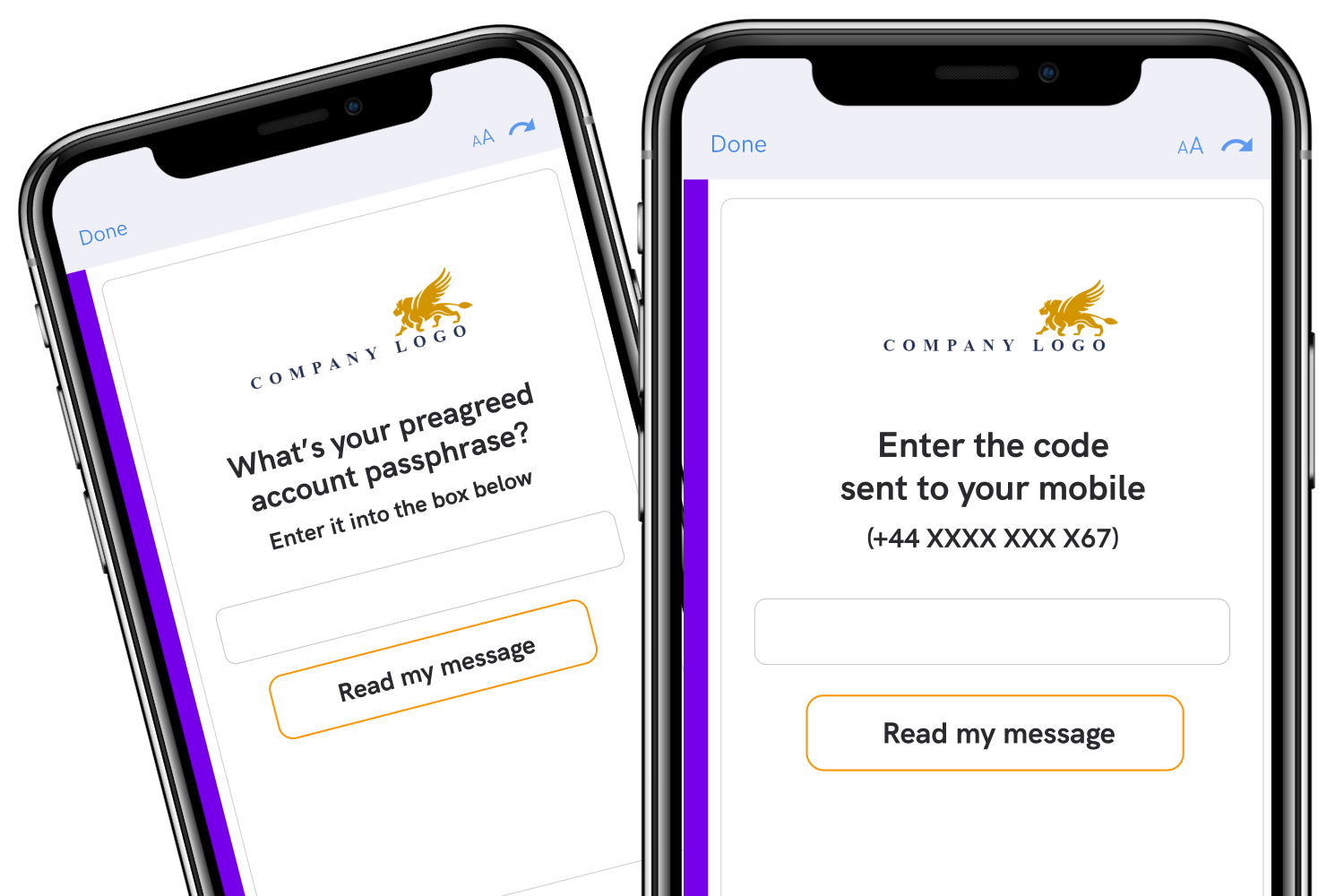
Mailock can work alongside Microsoft 365 or another email platform. Its role is not to replace every native control, but to add a consistent secure customer journey where access, response, evidence, and post-send control need to work together.
Email Security Statistics in 2026
Security statistics help explain the operating environment, but they should not be presented as problems that encryption alone can solve.
43% of UK Businesses Identified a Cyber Breach or Attack
The UK Government’s Cyber Security Breaches Survey 2025/2026 found that 43% of businesses identified a cyber security breach or attack in the previous 12 months, representing an estimated 612,000 UK businesses.
Phishing Remained the Most Common Reported Attack Type
The same survey found that 38% of businesses experienced phishing. This supports a layered email-security approach: encryption protects confidentiality, while sender authentication, filtering, user awareness, and response controls address different parts of phishing risk.
Around One in Four UK Adults Reported a Misdirected Email
In our 2023 consumer research, around a quarter of UK adults said they had accidentally shared personal data with the wrong recipient by email. Encryption can limit exposure only when the access model prevents that unintended recipient from opening the protected content.
Choosing the Right Email Encryption Approach
Start with the communication job rather than the encryption label.
Use TLS for protected transport between supporting mail systems. Consider S/MIME where managed certificates, digital signatures, and peer-to-peer interoperability are central. Use service-managed message encryption where native identity and rights controls fit the organisation and recipient journey.
For sensitive external customer communication, consider whether you also need configurable recipient checks, secure replies, sender-visible access, future-access control, and individual or automated delivery.
The best approach may combine native platform controls with a specialist workflow for selected messages rather than forcing every communication through one model.
FAQs
What Does Email Encryption Protect?
It protects readable email data by transforming it into ciphertext. The exact scope may cover a network connection, the message body and attachments, stored data, or a combination of these.
Is Every Email Encrypted?
Many major providers use TLS for connections, but protection depends on both systems and their configuration. Message-level encryption such as Microsoft Purview Message Encryption or S/MIME is a separate capability.
Does TLS Encrypt the Email Itself?
TLS encrypts the connection between participating systems. It does not by itself keep the message encrypted after that connection ends.
Does S/MIME Encrypt Email Attachments?
Yes. Attachments included in the protected MIME content are encrypted with the message. S/MIME requires compatible software, certificates, and access to the recipient’s public certificate.
Can Encryption Stop a Wrong Recipient Reading an Email?
Only if the access model prevents that recipient from decrypting or opening it. Encryption alone does not correct an address or distinguish between two people who can use the same authorised account.
Why Add Recipient Authentication to Encryption?
Encryption protects content, while a recipient check can add assurance before access is granted. The strength of that assurance depends on the authentication method and how it is configured.
Does the UK GDPR Require Email Encryption?
The UK GDPR does not require all personal information to be encrypted. It requires security appropriate to the risk and identifies encryption as one potential technical measure. Organisations should assess their processing, risks, available technology, and relevant sector requirements.
References
Encryption and Data Protection, Information Commissioner’s Office, 2026
FIPS 197: Advanced Encryption Standard, National Institute of Standards and Technology, 2023
How Exchange Online Uses TLS to Secure Email Connections, Microsoft, 2023
Email Encryption in Microsoft 365, Microsoft, 2026
Learn How Gmail Encrypts Your Emails, Google, 2026
Use S/MIME to Send and Receive Encrypted Messages in the Mail App in iOS, Apple, 2024
S/MIME Version 4.0 Message Specification, Internet Engineering Task Force, 2019
Email Security and Anti-Spoofing, National Cyber Security Centre, 2019
Cyber Security Breaches Survey 2025/2026, Department for Science, Innovation and Technology and Home Office, 2026
UK Consumer Report: Email Security, Beyond Encryption, 2023
Reviewed by
Sam Kendall, 17.07.26
This content is for general information only and is not legal advice.
|
Originally posted on 01 10 22
Sam Kendall works on digital marketing for Mailock by Beyond Encryption, helping build B2B marketing activity around research, first principles, and sustainable growth. He writes about marketing effectiveness, positioning, customer communications, and digital culture, with longer-form work published at ATNL.net. |
Email Series
Subscribe to
.svg)
Subscribe to Privacy Decoded, our monthly email briefing about privacy, digital trust, and the forces shaping our online world.
 Previous post