
Proofpoint Email Encryption vs Mailock: Review & Comparison
 Sabrina McClune


Proofpoint and Mailock both protect outbound email, but Proofpoint starts with policy and Mailock starts with the recipient. Proofpoint encrypts email automatically when messages meet its data-loss prevention rules. Mailock lets the sender choose how each recipient gets in, and keeps replies inside the same protected journey.
This review compares the two for organisations choosing how to protect email to customers and other people outside the organisation.
Proofpoint is worth a close look if you want encryption driven by data-loss prevention policy, within a wider email security platform.
Mailock is worth comparing where you want sender-chosen access checks, secure replies without an account, and identity checks sent by secure email.
Sources checked: 19 November 2026. Proofpoint sells encryption in more than one product, and features vary by product and licence. Mailock features vary by plan and deployment. Confirm current details with each supplier before you choose.
Comparison: We make Mailock, one of the products compared here, so we are not neutral. Details of other products come from their own published information and may have changed since this article was last reviewed. How we write comparisons.
Proofpoint and Mailock at a Glance
Proofpoint offers encryption in two places: Proofpoint Essentials, its suite for smaller organisations, and Proofpoint Email DLP and Encryption for larger ones. Confirm which one a quote covers.
| Decision area | Proofpoint | Mailock |
|---|---|---|
| Core role | Encryption within Proofpoint's email security products, driven by policies that detect sensitive data | Sender-led secure email for sensitive messages to customers and partners |
| How encryption starts | Automatically when a message meets policy, or by the sender from an Outlook add-in | From the web app or Outlook add‑in, prompted by security alerts; custom encryption triggers on Enterprise |
| Recipient access | Essentials: one-time encrypted links with no account or log-in. Email DLP and Encryption: portal, mobile browser and Outlook access options | The sender's choice of email code, security question or SMS code (by plan), plus Unipass ID sign‑in |
| After sending | Essentials: automatic read receipts, and administrators and thread owners can revoke access to a thread. Access lasts up to 30 days by default | Access visible in Message Tracker; Message Revoke closes future access at any time |
| Identity checks | Not described in the Proofpoint material we reviewed | ID, KYC, and AML checks by secure email on Pro and Enterprise, charged per check |
| Pricing | Essentials list prices published, with encryption in the Advanced and Professional packages. Email DLP and Encryption by quote | Free and paid plans; see the Mailock pricing page |
What Proofpoint Offers
Proofpoint is a large cybersecurity company, and encryption is one part of a wider email security platform. Its strength is automation: it finds sensitive information and applies protection without relying on each sender to remember.
According to Proofpoint, Email DLP and Encryption:
- identifies sensitive data in messages and attachments, including images and scanned files, using prebuilt identifiers, custom dictionaries and document fingerprinting;
- encrypts email automatically by sender, recipient, destination, message attributes or attachment type, with rules targeted by group through LDAP and Active Directory;
- offers transparent encryption with trusted partners whose gateways are compatible;
- gives recipients portal, mobile browser and Outlook access options, and lets users send and read encrypted messages through Outlook add-ins.
For Proofpoint Essentials, the new email encryption experience (rolled out from December 2024) lets external recipients open encrypted email through one-time encrypted links, without creating an account or logging in. Every encrypted email includes read receipts, administrators and original thread owners can revoke access to a whole thread, and messages stay available for up to 30 days, with shorter periods available.
How Mailock Works
Mailock puts more of the decision with the sender. A sender protects a message from the web app or the Mailock Add-in for Outlook, and security alerts prompt them when trigger words appear; Enterprise customers can add custom encryption triggers, so protection can follow policy too.
Each protected message uses message-level AES-256 encryption, with an access check the sender chooses: an email code, a security question or an SMS code. Recipients reply without an account, financial services recipients can sign in with Unipass ID, and the sender can see access in Message Tracker and close it with Message Revoke.
Mailock's data-loss prevention is narrower than Proofpoint's. Security alerts look for trigger words; they do not analyse images or fingerprint documents. Organisations that need deep content inspection across all outbound email may want a policy engine alongside or instead of it.
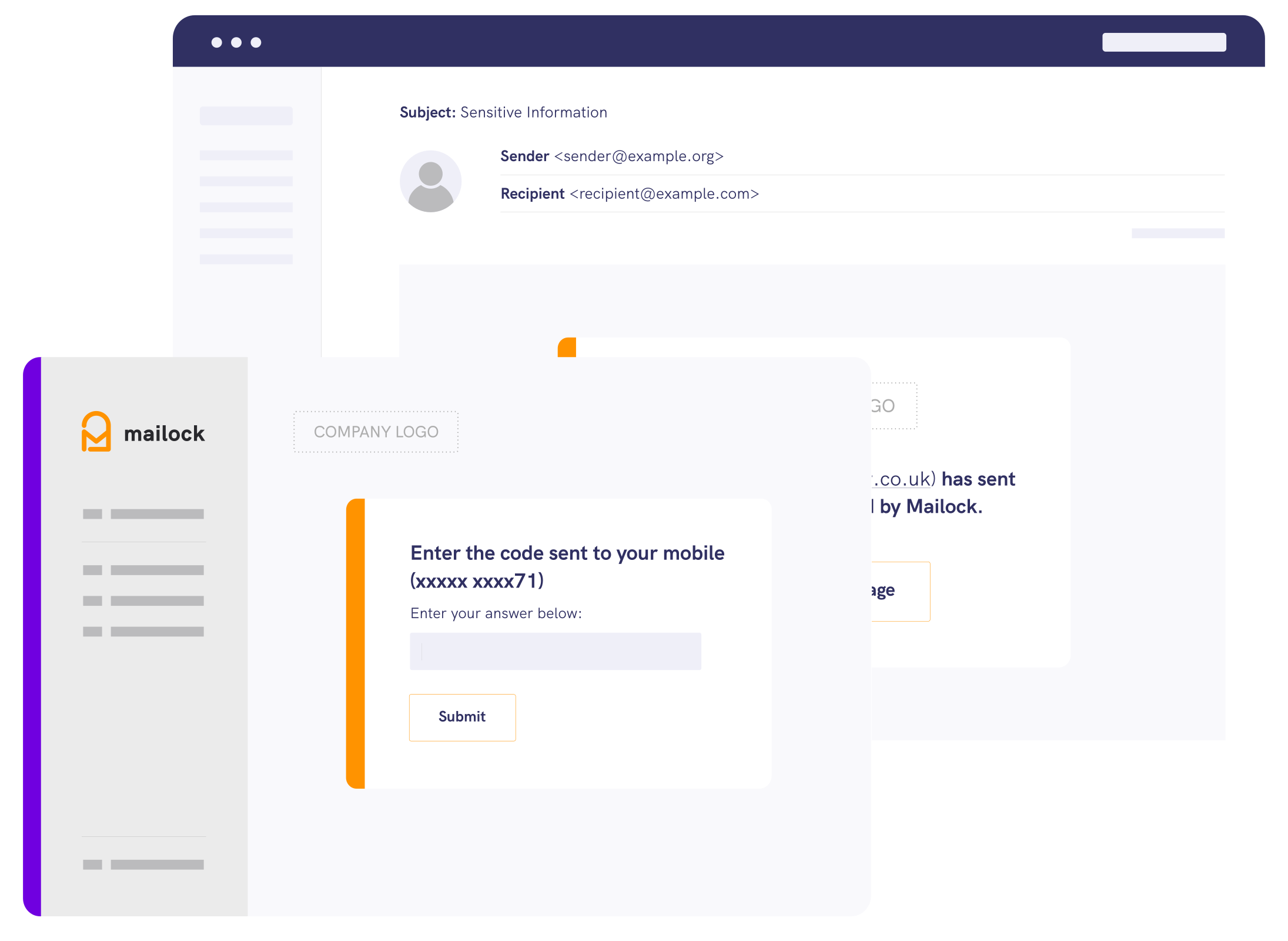
The recipient side of a Mailock message, reached through the sender's chosen access check.
Recipient Experience: Opening and Replying
Trial both with your own policies in mind: send a message that your rules should catch and one they should not, then check what each recipient sees and how they reply. Use test addresses and sample documents only.
Proofpoint Essentials' one-time links are quick to open, and Proofpoint says they reduce the risks of weak or shared passwords. Check how your configuration handles a recipient who needs to return to the message or reply, and which access options the enterprise product gives your recipients.
On the Mailock side, the recipient's route depends on the sender's choice. A security question or an SMS code adds something the wrong person is unlikely to have; an email code offers less protection if the address itself is wrong, because it goes to that same inbox.
One-time links and access checks both control who opens a message; neither confirms the person's identity. Where that matters, a Mailock sender can request an identity check by secure email and receive the results pack the same way, which keeps the check inside the communication rather than in a separate tool.
Mailock identity checks are available on Pro and Enterprise; each completed check is charged, and the prices are published.
When Proofpoint May Be the Better Fit
Proofpoint may suit you better if you want encryption to follow data-loss prevention policy across all outbound email, with little depending on each sender's judgement.
It may also fit if you already use Proofpoint for inbound protection, want transparent encryption with trusted partners, or need content inspection that covers images and scanned documents.
When Mailock May Fit
Mailock may suit you better if you want the sender to choose an access check for each message, a reply route that needs no account, and direct visibility of access after sending.
It may also suit firms that want identity checks sent from the same service as their secure email, and financial services teams whose clients use Unipass ID.
Mailock's limits matter here too. It is a separate tool for senders to adopt rather than something that works unseen at the gateway, and once a recipient has downloaded a file, closing access does not undo that. It is not an inbound email security product or a full data-loss prevention platform, so firms that need those would run it alongside one.
Questions to Ask Before You Choose
- Should encryption follow policy automatically, or should senders choose when and how to protect a message?
- Which Proofpoint product, and which package, does your quote cover?
- What must a recipient do to get in, and to reply?
- How long should recipients keep access, and who can end it?
- Do you also need identity checks, and from which supplier?
FAQs
Which Proofpoint Products Include Encryption?
Proofpoint Essentials includes email encryption in its Advanced and Professional packages, according to its published EMEA price list. Larger organisations can buy Proofpoint Email DLP and Encryption.
Do Proofpoint and Mailock Recipients Need an Account?
Proofpoint Essentials' newer experience uses one-time links with no account or log-in. Mailock recipients do not need an account to read or reply, only to send new secure emails themselves.
Does Either Product Offer Identity Checks?
Mailock offers ID, KYC, and AML checks sent by secure email, on Pro and Enterprise. Proofpoint's encryption controls access to messages; we did not find identity checks described in the Proofpoint material we reviewed.
Compare Mailock with other secure email providers
References
Email DLP and Encryption, Proofpoint, checked 19 November 2026
New Email Encryption Experience, Proofpoint Essentials release notes, checked 19 November 2026
Essentials Standard Price List, Monthly, MSRP EMEA, Proofpoint, undated, checked 19 November 2026
Reviewed by
Sam Kendall, 19.11.26
Sabrina McClune, 19.06.25
Read our editorial policy.
This content is for general information only and is not legal advice. Product features, licensing and service descriptions can change.
|
Originally posted on 22 09 23
Sabrina McClune writes about cybersecurity, data protection, digital identity, and digital transformation for Mailock by Beyond Encryption, helping regulated sectors understand complex technology and compliance topics with greater clarity. |
Email Series
Subscribe to
Subscribe to Privacy Decoded, our monthly email briefing about privacy, digital trust, and the forces shaping our online world.
 Previous post
